
Composition
composite(_:space:) draws one or more CompositeLayers over a pipeline, in array order, in one native operation. A layer is itself a pipeline, so you can prepare a logo once and apply it to many images. Only a layer’s image transformations apply; its encoder and metadata settings are ignored and it is never encoded to be composed.
CompositeLayer
Section titled “CompositeLayer”| Property | Default | Notes |
|---|---|---|
| image | required | Another Hokusai pipeline. |
placement / x, y |
.at(x: 0, y: 0) |
CompositeLayer(_:x:y:blend:opacity:) is the short form. |
blend |
.over |
How layer pixels combine with what is below. |
opacity |
1 |
Multiplies the layer’s alpha, 0…1; outside that range throws invalidOption when composite is called. |
Placement
Section titled “Placement”Placement is the position of the layer’s top-left corner, spelled three ways:
.at(x:y:): exact pixel coordinates. They may be negative or reach past the base; the layer is clipped to the base..gravity(_:offsetX:offsetY:): anchored to a compass point of the base. At an edge the offset is padding towards the inside (for.southEast, left and up); along a centred axis it is a signed shift..tile(gravity:): the layer repeated edge to edge over the whole base, one tile aligned togravity; for image layers.
let photo = try Hokusai(url: URL(fileURLWithPath: "scene.png")).resize(width: 560)let logo = try Hokusai(url: URL(fileURLWithPath: "emblem.png")).resize(width: 90)
let placements: [(String, Placement, Double)] = [    ("at", .at(x: 20, y: 20), 1),    ("gravity", .gravity(.southEast, offsetX: 16, offsetY: 16), 0.85),    ("clipped", .at(x: -45, y: 300), 1),                       // partly outside: clipped to the base    ("tile", .tile(gravity: .northWest), 0.25),]for (name, placement, opacity) in placements {    try await photo        .composite([CompositeLayer(logo, placement: placement, opacity: opacity)])        .webp(quality: 85)        .write(to: URL(fileURLWithPath: "\(name).webp"))}
.at(20, 20)WEBP · 560 × 350 · 11 KB 
.southEast, offset 16WEBP · 560 × 350 · 10 KB 
.at(−45, 300)WEBP · 560 × 350 · 10 KB 
.tile, opacity 0.25WEBP · 560 × 350 · 20 KB
Blend modes
Section titled “Blend modes”BlendMode follows the Porter-Duff and PDF sets that libvips implements: clear, source, over (default), in, out, atop, the destination… variants, xor, add, saturate, multiply, screen, overlay, darken, lighten, colorDodge, colorBurn, hardLight, softLight, difference, exclusion. source replaces what is below, clear erases it; in, out and atop keep part of the layer or the base according to the other side’s alpha.
Here the layer is a black-to-white ramp over the landscape:
let photo = try Hokusai(url: URL(fileURLWithPath: "scene.png")).resize(width: 360)// The layer is the black-to-white ramp, resized to the photo.let ramp = try Hokusai(url: URL(fileURLWithPath: "mask.png")).resize(width: 360, height: 225, fit: .fill)
let modes: [(String, BlendMode)] = [    ("over", .over), ("multiply", .multiply), ("screen", .screen),    ("overlay", .overlay), ("difference", .difference), ("softLight", .softLight),]for (name, mode) in modes {    try await photo        .composite([CompositeLayer(ramp, blend: mode)])        .webp(quality: 85)        .write(to: URL(fileURLWithPath: "\(name).webp"))}
.overWEBP · 360 × 225 · 1 KB 
.multiplyWEBP · 360 × 225 · 4 KB 
.screenWEBP · 360 × 225 · 4 KB 
.overlayWEBP · 360 × 225 · 6 KB 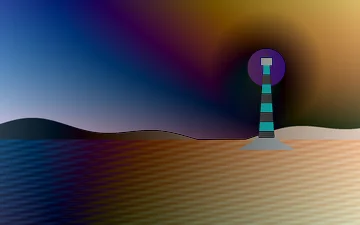
.differenceWEBP · 360 × 225 · 6 KB 
.softLightWEBP · 360 × 225 · 6 KB
.over with an opaque layer simply replaces the base. Use .multiply to darken, .screen to lighten, .overlay and .softLight to add contrast, .difference for comparison, and keep .over for logos with transparency.
Colour space
Section titled “Colour space”space is the colour space layers are blended in: .srgb (default) blends the stored values, as design tools and browsers do; .linear blends linear light, which mixes colours as light does. A 50 % black layer over a grey ramp:
let backdrop = try Hokusai(url: URL(fileURLWithPath: "mask.png")).resize(width: 360, height: 120, fit: .fill)// A single black pixel enlarged into a 360 × 120 layer, at half opacity.let black = try Hokusai(raw: Data([0, 0, 0]), width: 1, height: 1, format: .rgb8)    .resize(width: 360, height: 120, fit: .fill, kernel: .nearest)
for (name, space) in [("srgb", CompositingSpace.srgb), ("linear", .linear)] {    try await backdrop        .composite([CompositeLayer(black, opacity: 0.5)], space: space)        .png()        .write(to: URL(fileURLWithPath: "\(name).png"))}
.srgbPNG · 360 × 120 · 2 KB 
.linearPNG · 360 × 120 · 2 KB
In .linear a half-transparent black layer comes out lighter than in .srgb, as the example shows. Use .linear for physically plausible light mixing; keep the default to match what a browser would draw.
Later layers draw over earlier layers, and the array order is the stacking order. Because a layer is a pipeline, you can blur, resize or recolour it first:
let base = try Hokusai(url: URL(fileURLWithPath: "scene.png")).resize(width: 360)let big = try Hokusai(url: URL(fileURLWithPath: "emblem.png")).resize(width: 200)let small = try Hokusai(url: URL(fileURLWithPath: "emblem.png")).resize(width: 120).negate()
// Later layers draw over earlier ones.let a = [CompositeLayer(big, x: 90, y: 10), CompositeLayer(small, x: 150, y: 50)]try await base.composite(a).webp(quality: 85).write(to: URL(fileURLWithPath: "small-on-top.webp"))try await base.composite(a.reversed()).webp(quality: 85).write(to: URL(fileURLWithPath: "big-on-top.webp"))
// A layer is a pipeline of its own: its transformations apply, its encoder choice is ignored.let blurred = try big.blur(sigma: 6).png()try await base.composite([CompositeLayer(blurred, x: 90, y: 10)]).webp(quality: 85)    .write(to: URL(fileURLWithPath: "layer-pipeline.webp"))
big, then smallWEBP · 360 × 225 · 8 KB 
reversedWEBP · 360 × 225 · 7 KB 
layer blurred firstWEBP · 360 × 225 · 5 KB
Errors
Section titled “Errors”| Situation | Result |
|---|---|
opacity outside 0…1 or not finite |
invalidOption, thrown by composite |
| A layer that fails to load or evaluate | the error of the terminal that evaluates the base |