
Resize
resize changes the pixel dimensions of an image. Reach for it to make thumbnails, fit uploads into a layout, or produce an exact box such as a 1200 × 630 social card. The sample image used on this page is a 1600 × 1000 landscape whose subject, a lighthouse, sits in the right third, so the effect of every option is visible.
Minimal example
Section titled “Minimal example”let image = try Hokusai(url: URL(fileURLWithPath: "scene.png"))
// One dimension: the aspect ratio is kept.try await image.resize(width: 400).webp(quality: 85) .write(to: URL(fileURLWithPath: "width-400.webp"))
// Both dimensions: `fit` decides how the image meets the box (default: .cover).try await image.resize(width: 400, height: 400).webp(quality: 85) .write(to: URL(fileURLWithPath: "box-400.webp"))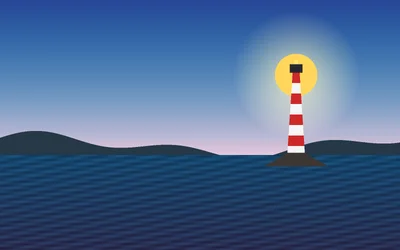
width: 400WEBP · 400 × 250 · 6 KB 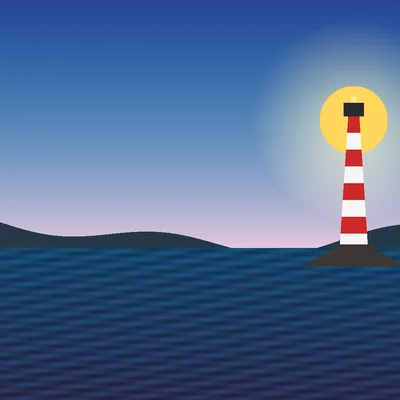
400 × 400WEBP · 400 × 400 · 7 KB
With one dimension, the other follows the aspect ratio. With both, fit decides how the image meets the box, and the default, .cover, fills the box and crops the overflow.
Parameters
Section titled “Parameters”| Parameter | Type | Default | Notes |
|---|---|---|---|
width |
Int? |
nil |
Pixels, 1…2,147,483,647. At least one of width and height is required. |
height |
Int? |
nil |
Same range. |
fit |
ResizeFit |
.cover |
.inside, .outside, .fill, .cover, .contain. |
position |
ResizePosition |
.center |
Where a .cover crop is taken from: nine compass points, .attention, .entropy. |
kernel |
ResizeKernel |
.lanczos3 |
.nearest, .linear, .cubic, .mitchell, .lanczos2, .lanczos3, .mks2013, .mks2021. |
withoutEnlargement |
Bool |
false |
Keep the current size instead of enlarging. |
withoutReduction |
Bool |
false |
Keep the current size instead of reducing. |
background |
Color |
.transparent |
Padding colour for .contain. |
A call with neither width nor height, or with a value outside the range, throws HokusaiError.invalidOption immediately, when the pipeline is built.
Choosing a fit
Section titled “Choosing a fit”let image = try Hokusai(url: URL(fileURLWithPath: "scene.png"))let box = (width: 480, height: 480)
let fits: [(String, ResizeFit)] = [ ("cover", .cover), ("contain", .contain), ("fill", .fill), ("inside", .inside), ("outside", .outside),]for (name, fit) in fits { try await image .resize(width: box.width, height: box.height, fit: fit, background: Color(red: 0.93, green: 0.93, blue: 0.9)) .png() .write(to: URL(fileURLWithPath: "\(name).png"))}
.coverPNG · 480 × 480 · 106 KB 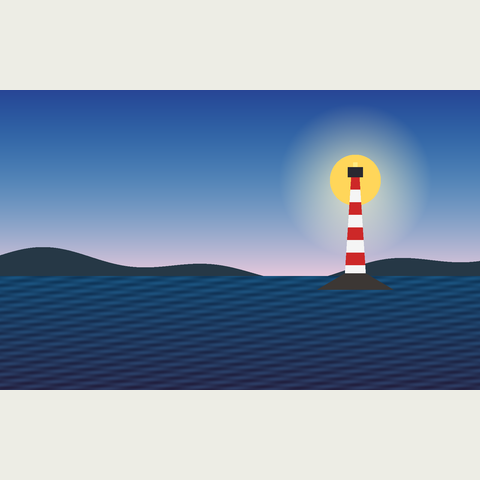
.containPNG · 480 × 480 · 84 KB 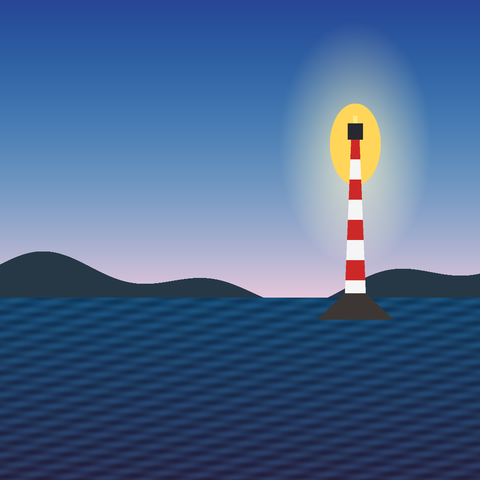
.fillPNG · 480 × 480 · 115 KB 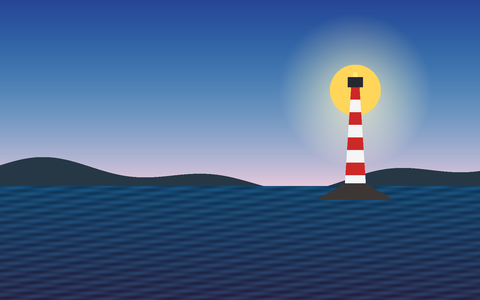
.insidePNG · 480 × 300 · 83 KB 
.outsidePNG · 768 × 480 · 154 KB
All five fits for a 480 × 480 box. Note the sizes: only .cover, .contain and .fill return exactly the requested box.
| Fit | Aspect ratio | Result size | Use it for |
|---|---|---|---|
.cover |
kept; overflow is cropped | exactly width × height |
thumbnails and cards that must be filled (not with withoutEnlargement on small sources, see below) |
.contain |
kept; the rest is padded with background |
exactly width × height |
showing the whole image in a fixed slot |
.fill |
ignored; stretched | exactly width × height |
rare; deliberate distortion |
.inside |
kept | the largest size within both bounds | “no larger than” limits |
.outside |
kept | the smallest size covering both bounds | when you will crop it yourself |
Where a cover crop is taken
Section titled “Where a cover crop is taken”A .cover crop discards part of the image, and position picks what survives. The default centres the box. Here a square is cut from the landscape:
let image = try Hokusai(url: URL(fileURLWithPath: "scene.png"))
// A square cover crop keeps only part of the landscape. `position` chooses which part.let positions: [(String, ResizePosition)] = [    ("center", .center), ("west", .west), ("east", .east),    ("attention", .attention), ("entropy", .entropy),]for (name, position) in positions {    try await image        .resize(width: 360, height: 360, fit: .cover, position: position)        .png()        .write(to: URL(fileURLWithPath: "\(name).png"))}
.centerPNG · 360 × 360 · 73 KB 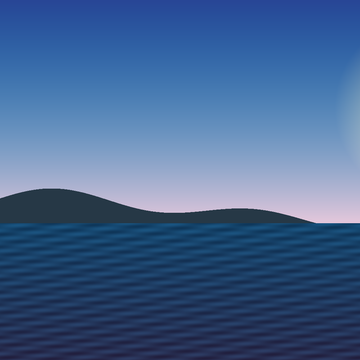
.westPNG · 360 × 360 · 53 KB 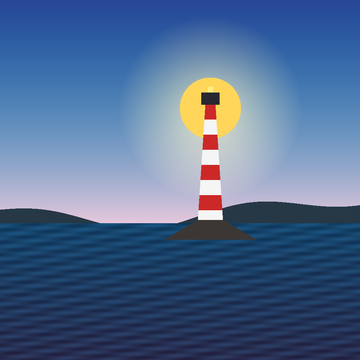
.eastPNG · 360 × 360 · 81 KB 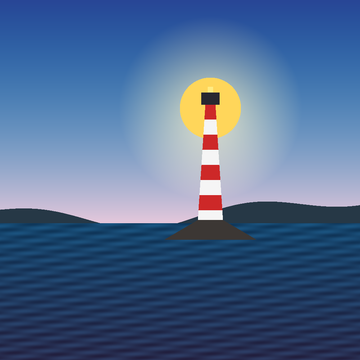
.attentionPNG · 360 × 360 · 81 KB 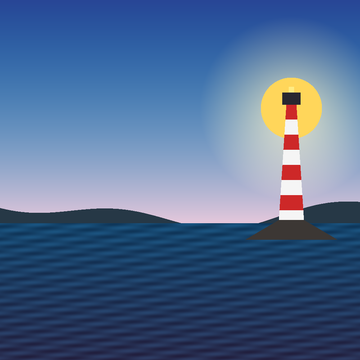
.entropyPNG · 360 × 360 · 78 KB
The nine compass positions (.north, .south, .east, .west and the four corners, plus .center) anchor the crop box to that side. .attention favours skin tones, saturated colour and detail; .entropy favours the region with the most local variation. Both are content-aware and are the same selection that smartCrop makes. position has no effect with any fit other than .cover.
Not enlarging, not reducing
Section titled “Not enlarging, not reducing”let small = try Hokusai(url: URL(fileURLWithPath: "emblem.png")).resize(width: 100)
// Without a guard, a larger width enlarges the 100-pixel image.let enlarged = try await small.resize(width: 300).png().data()// withoutEnlargement leaves an image that is already smaller than the request alone.let guarded = try await small.resize(width: 300, withoutEnlargement: true).png().data()// withoutReduction is the opposite guard: it only ever makes the image larger.let notReduced = try await small.resize(width: 50, withoutReduction: true).png().data()
print("enlarged", enlarged.info.width, "guarded", guarded.info.width, "not reduced", notReduced.info.width)try guarded.data.write(to: URL(fileURLWithPath: "guarded.png"))try enlarged.data.write(to: URL(fileURLWithPath: "enlarged.png"))
defaultPNG · 300 × 300 · 38 KB 
withoutEnlargementPNG · 100 × 100 · 3 KB
When the computed size is larger than the current image in either dimension, withoutEnlargement: true replaces it with the current size; it is not clamped proportionally. withoutReduction is the mirror image. Use withoutEnlargement for “at most this wide” limits when images of unknown size arrive. What a guarded request returns depends on the fit, and one combination fails:
// A 100 × 100 image and a 480 × 480 request that would enlarge it.let small = try Hokusai(url: URL(fileURLWithPath: "emblem.png")).resize(width: 100)
for (name, fit) in [("inside", ResizeFit.inside), ("contain", .contain), ("cover", .cover)] {    do {        let output = try await small            .resize(width: 480, height: 480, fit: fit, withoutEnlargement: true, background: .white)            .png().data()        print(name, "→", output.info.width, "×", output.info.height)    } catch {        print(name, "→ throws", error)    }}
Fit (480 × 480 request, 100 × 100 source, withoutEnlargement: true) |
Result |
|---|---|
.inside |
100 × 100: the image is left alone |
.contain |
480 × 480: the image stays 100 pixels and is padded into the box |
.cover |
throws HokusaiError.transform (extract): the unenlarged image is smaller than the crop box |
So with a box on a possibly small image, use .inside for a limit or .contain for a padded slot, not .cover; or read metadata() first and choose the fit.
Resampling kernels
Section titled “Resampling kernels”The kernel is the filter that computes new pixels. The default, .lanczos3, is sharp and is right for almost everything. .nearest copies pixels without blending, which preserves hard pixel edges and suits pixel art; the others trade sharpness for smoothness. Each image below was shrunk to 40 pixels with the named kernel, then enlarged with .nearest only so the pixels can be seen.
let image = try Hokusai(url: URL(fileURLWithPath: "emblem.png"))
// Shrinking and then viewing 4× larger shows how each kernel resamples.let kernels: [(String, ResizeKernel)] = [    ("nearest", .nearest), ("linear", .linear), ("cubic", .cubic),    ("mitchell", .mitchell), ("lanczos3", .lanczos3),]for (name, kernel) in kernels {    try await image        .resize(width: 40, kernel: kernel)   // shrink to 40 pixels        .resize(width: 160, kernel: .nearest) // enlarge with .nearest only to make pixels visible        .png()        .write(to: URL(fileURLWithPath: "\(name).png"))}
.nearestPNG · 160 × 160 · 1 KB 
.linearPNG · 160 × 160 · 2 KB 
.cubicPNG · 160 × 160 · 2 KB 
.mitchellPNG · 160 × 160 · 2 KB 
.lanczos3PNG · 160 × 160 · 2 KB
.mks2013 and .mks2021 (Magic Kernel Sharp) need libvips 8.17 or newer, above Hokusai’s 8.16 baseline. On an older build, asking for one throws HokusaiError.unsupported when the step is added, so check Hokusai.capabilities() or handle the error. Use hokusai info to see your libvips version.
Combining resize with other operations
Section titled “Combining resize with other operations”- Order changes pixels, not just speed. Resizing before a blur blurs at the new scale; blurring first and then shrinking gives a different, softer result. See Order of operations.
- Orientation first. Phone photos carry an EXIF orientation. Put
autoOrient()beforeresize, or a portrait photo is resized with its width and height swapped. See Orientation. extractafterresizeaddresses the resized pixels, not the original ones (Crop & canvas).- Shrink-on-load. When a still JPEG or WebP pipeline starts with
resize(optionally afterautoOrient), the decoder scales while reading. The output dimensions are identical to the normal path; only the work is smaller. Aresizethat comes after another operation does not get this.
Errors and constraints
Section titled “Errors and constraints”| Situation | Result |
|---|---|
Neither width nor height, or a value outside 1…Int32.max |
HokusaiError.invalidOption, thrown when building the pipeline |
A colour component outside 0…1 in background |
HokusaiError.invalidOption, thrown immediately |
.mks2013 / .mks2021 on libvips older than 8.17 |
HokusaiError.unsupported, thrown when the step is added |
.cover with both dimensions and withoutEnlargement: true on an image smaller than the box |
HokusaiError.transform (extract), thrown when the pipeline is evaluated |
A result over RuntimeConfiguration.maxOutputPixels (2³⁰ pixels by default) |
HokusaiError.resource (outputPixels), thrown when the pipeline is evaluated, before any pixel is computed |
Related
Section titled “Related”- Crop & canvas:
extract,extend,trim,smartCrop - Encoding & output: the output formats used above
- Social card recipe